And now you have this mess and work, where you put it?
thing to look at and easy to use is below the Header or "Logo" as he called my friend George, and you put both the original blog in the category, to go jumping from one to indirectly another.
so I have it on my blog "With a little help from my friends" since modified the original title:
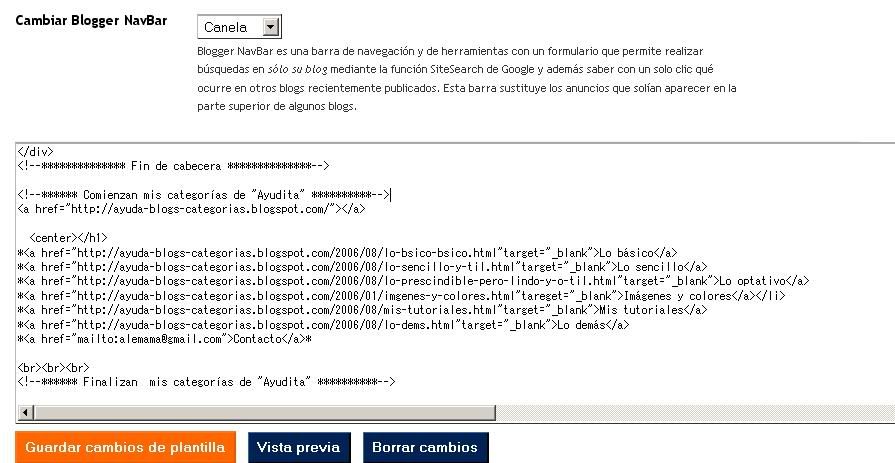
Click to enlarge and view details
In my blog "Sunny and Warm" in which I have not yet changed the header, I have this:
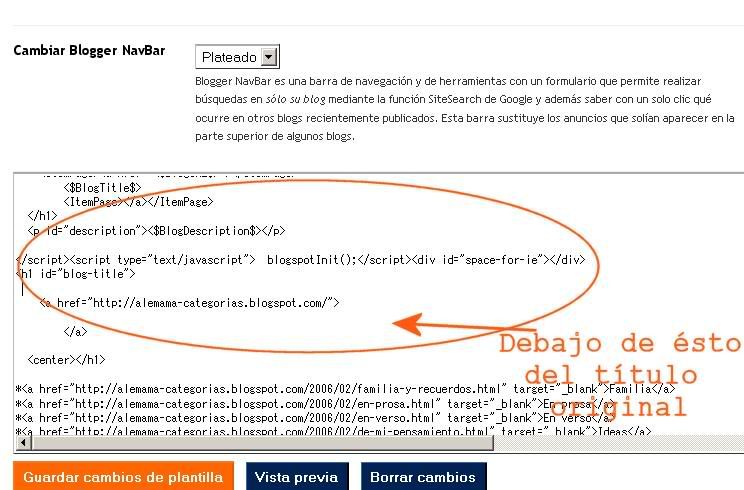
look out in some detail:
1 º) I put a star one to separate one category from another and in another a slash. Requena Carola has put them "brackets" is a matter of taste and desire, not obligation. 2 º) All mine have code "open in new window" I explain here.
3 º) Enter the URL of your site as it appears in the example I left to go well and opening anything published after DO NOT change any date or name as it appears the fatal "NOT FOUND" (not found). What can and should modifiacr every time you post something new is the post in the appropriate category to make it a day. That should be a habit: post up, more corrected until we do the work Blogger easier.
Well, I hope I have not forgotten anything. In any case can be found lots of sites that explain it well. Good luck! and not so terrible, it's just annoying but worth it! ______________________


0 comments:
Post a Comment